


Make sure in the "save file as" box you're selecting a .jpg. If that doesn't work, is there any way to go to file > save as (or are the images embedded?).
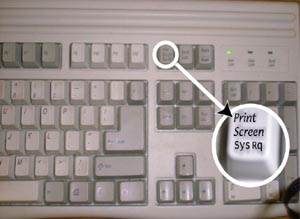
To do a screen shot, while the images are viewed on your monitor hit your Prt Scr button on your keyboard, located above the 'home' and 'insert' keys and next to the F12 key. Then open up a graphics program and paste the image. You may need to crop everything else out, but this DOES work.
Thats where the butotn is lol
EDIT: And that's odd your programs say its an invalid format... that should have nothing to do with the attachments themselves, just taking a "picture" of everything that is currently viewable on your monitor at any given point in time. Have you tried pasting it in MSPaint just to see?


 Reply With Quote
Bookmarks