


Ok I'm a dunce how do you apply your signature.
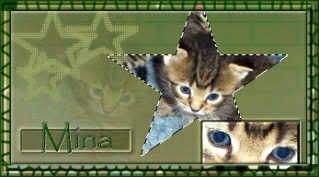
Kfamr just created a beautiful signature of Mina, and I don't know how to attach it.


 Central MI

Ok I'm a dunce how do you apply your signature.
Kfamr just created a beautiful signature of Mina, and I don't know how to attach it.
A positive attitude may not solve allyour problems, but it will annoy enough people to make it worth the effort.-Herm Albright
certifiable...

The file needs to be saved to a storage area - I put it in my photobucket and it can stay there - no problem.
Right click on the picture, click properties and then highlight everything after the URL - edit copy this...everything beginning with http....until the name of the file which is mina.jpg
Now just look at the top of the screen and click on User CP (control panel) and then click on Edit Profile. Look down for the box that says signature (where your quote is) and edit paste this code in that box. In front and back, it will need image tags so in front put IMG inside brackets [put it here]and in back put /IMG also inside brackets and then click apply or submit at the bottom and you should have your new siggy on all your posts!
You can still leave your quote there, too!
Last edited by sirrahbed; 11-18-2004 at 08:26 AM.
Central MI
Thanks Deb. I really appreciate it. Hopefully it will work.
A positive attitude may not solve allyour problems, but it will annoy enough people to make it worth the effort.-Herm Albright
certifiable...
Try the new directions ok? when I pasted the code, it was not complete, so you need to take it right from the image and then it should work
Central MI
Still nothing
What am I doing wrong?
A positive attitude may not solve allyour problems, but it will annoy enough people to make it worth the effort.-Herm Albright
Central MI
Never mind I fixed. Was putting spaces where they didn't need to be.
Thanks DEB!!!!!!! ~big hugs.~
A positive attitude may not solve allyour problems, but it will annoy enough people to make it worth the effort.-Herm Albright
certifiable...
looks like spaces between your image tags and the URL?? Try taking out the spaces, OK? Otherwise it looks PURRFECT
Central MI
Thank you Deb. Now everyone can see Mina's baby picture. will have to get a new one pretty soon.
A positive attitude may not solve allyour problems, but it will annoy enough people to make it worth the effort.-Herm Albright
 Posting Permissions
Copyright © 2001-2013 Pet of the Day.com


 Reply With Quote
Bookmarks