


I would like 1, Thanks!!!


 Registered User

I would like 1, Thanks!!!
 Registered User
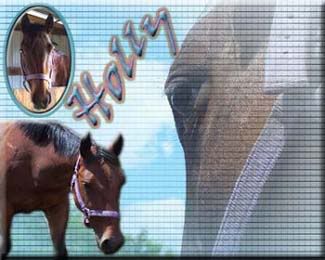
Same pictures of Holly as before but a little larger...
One of my favorites.

Rest in peace Princess Holly Bear...
 Offical Dog Freak
Id like a siggy,but um how do you upload pictures on here?!
-Kay
~Kay&Chewy~
FCA(Future Cledus's of America)
FTC(Future Twister Chaser)
FCR(Frer. Critter Ranch)
FFA(Future Farmers of America)
The people want peace...
Ok, Sorry I'm taking so long. Last night we had alot of family over (as well as a furfriend, will post pics sometimes) After everyone left, my brother, Lauren (BluStang24), my cousin and her boyfriend, and I all hung out at my brother's house. I'm not feeling so well right now, I'm in major pain. My wisdom teeth are coming in.
They made me feel a little better hehe. Orion was *purrrring.* Simba and Nala were jealous when I got home.
I hope to get all of your sigs finished tonight, if not I will soon, promise. When I do get them done, I will post them in here as well send you all a PM with them in it. Sorry I hadn't gotten them done last night, hope you understand.
~Kay, Athena, Ace, Kiara, Mufasa, & Alice!
"So baby take a axe to your makeup kit
Set ablaze the billboards and their advertisements
Love with all your hearts and never forget
How good it feels to be alive
And strive for your desire"
-rx bandits
 Banned
take your time!
Registered User
Dont worry about it! Take your time! I hope you feel better!
Registered User
Take your time...Im sure no one is in a rush~! Hope you feel better soon~!
Also is it ok if you could help me learn how to put my sig. under my name...I don't know how.....thanx...
Registered User
Upload the picture to imagestation, then click on the signature (a new window should pop up), then right click on the picture and click properties. What you want is the URL (adress) of the picture. Copy the URL down then come back to where you put it in your signature and put [img] in the beggining of it and start typing the adress (NO SPACES!) then at the end put [/img]Originally posted by GSDgurl
Take your time...Im sure no one is in a rush~! Hope you feel better soon~!
Also is it ok if you could help me learn how to put my sig. under my name...I don't know how.....thanx...
Sorry if this was confusing!
Registered User
Thanx GRL~!! That was a lot of help. When Kayann finishes it(no rush) I'll see if I can do it right.
Thanx again~!
Registered User
Your Welcome!
 Registered User
kayann i dont want to take ur job but i was bored!! hehe.. if u dont like it kayann will do it! lol
 LoVeD
LoVeD

That's just the way I feel! I had one made of Holly, just because she's such a gorgeous dog. I don't have it now, but I'll post it just in case you do like itOriginally posted by CamCamPup33
kayann i dont want to take ur job but i was bored!!
Dayna, Alex, Phoebe, Cleo, Rolo, Scooter, & Holly
Thank you so much Popcornbird!
LoVeD
Ok, here's the one I made of Holly. You don't have to use it (afterall, you did ask Kayann!), but I hope you like it!

Dayna, Alex, Phoebe, Cleo, Rolo, Scooter, & Holly
Thank you so much Popcornbird!
 Registered User
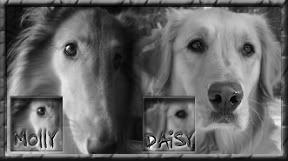
Not too long ago you didn't know how to do this.... and now you do! It's amazing how easy it really is to learn how to post pictures here on Pet Talk! I'm so proud of you, Julie! Keep up the good work, and I just love seeing the pics you post of your sweet, beautiful Daisy and Molly girl!Originally posted by GoldenRetrLuver
Upload the picture to imagestation, then click on the signature (a new window should pop up), then right click on the picture and click properties. What you want is the URL (adress) of the picture. Copy the URL down then come back to where you put it in your signature and put [img] in the beggining of it and start typing the adress (NO SPACES!) then at the end put [/img]
Sorry if this was confusing!
Kaitlyn (the human)
Sadie & Rita (Forever in Our Hearts) (the Labbies)
Registered User
Hey, I love the one you made me, it's really cute! Thanks! But, I've changed my mind, can you pretty please make me a signature with this picture? I want it to be very very similar to the one I have now, only with a different picture! Thank you sooooooo much! I really appreciate it!Originally posted by apcrs5122
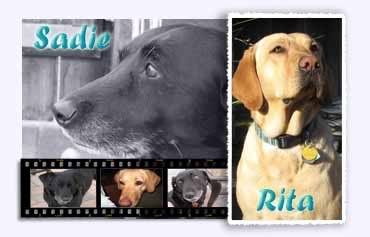
Ok, Kayann, I'm not stealing your signature-making job, I'm just really bored too! I made one for you, LabLoverKEB. I don't think you'll like it, I was just messing around with stuff, and thought it was kind of funny. If you don't like it, have Kayann do it, or I can do a different one
Here it is......(the worst thing I've ever made)
Tah Dah! The wonderful Sadie May(s)!!
Here's the picture!:

Kaitlyn (the human)
Sadie & Rita (Forever in Our Hearts) (the Labbies)
 Posting Permissions
Copyright © 2001-2013 Pet of the Day.com

 Reply With Quote

Bookmarks