


When editing pictures.... how do you add a border?
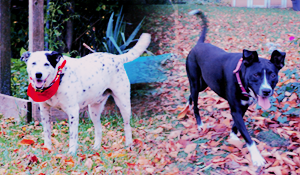
I did the puppers Christmas photoshoot and I am choosing the best picture.
I'd like to add a Christmas theme border around it.
How can I do it?
What program do I need?
Thanks
carmen


 and Frankie's too... :)
When editing pictures.... how do you add a border?
I did the puppers Christmas photoshoot and I am choosing the best picture.
I'd like to add a Christmas theme border around it.
How can I do it?
What program do I need?
Thanks
carmen
www.youravon.com/ckohler Pls like my fb page http://www.facebook.com/CarmensAvonBeautyAndMore
 Mayor
Mayor
Are you on a Mac or a PC? What photo-editing software do you already own?
and Frankie's too... :)
I own a PC that runs Vista.
I have CS3 Photoshop and I'm not sure what else.
www.youravon.com/ckohler Pls like my fb page http://www.facebook.com/CarmensAvonBeautyAndMore
 love guster dont eat them
I wish I could help, but I don't know how to do those kinds of things, either. Maybe you could make the canvas a different size? I don't know about making it Christmasy, but you could make it a holiday color...like red. I think you can do that, anyway, hahaha. Good luck, can you share the finished project?
The idea that some lives matter less is the root of all that is wrong with the world. - Dr. Paul Farmer
 I'm not a spazmo, Vyvyan!

If you just want colored borders, I'll show you two ways that I do it. Let me go take some screenshots. I use CS3 on my mac.
Alright, one way.
Open the picture and go to Image > Canvas size.
Very large picture
Change the scale to pixels, it makes it easier. Decide how many pixels you want on each side ad double that number. Type it into both the width and height boxes and click ok.
You can change the color of the canvas now if you want but I do that later.
This is what you get.
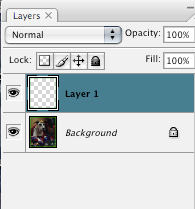
Now, use the magic wand toolto select the border, copy and paste it, so you should get this.
Select the border and go to Image > Adjustments > Hue/Saturation
large picture
move the sliders back and forth until you get the color you want.
Then you can use layer styles to do things to it. To do this you can go to Layer > Layer styles and click one and experiment.
I repeated the process to get this.

Niño & Eliza
 Registered User
Photoshop CS3 is probably more advanced than my understanding, although I found a tutorial that may assist you: here.
and Frankie's too... :)
Thanks Eva and Reggie!
I was able to make the border I wanted with your help!
www.youravon.com/ckohler Pls like my fb page http://www.facebook.com/CarmensAvonBeautyAndMore
 Posting Permissions
Copyright © 2001-2013 Pet of the Day.com

 Reply With Quote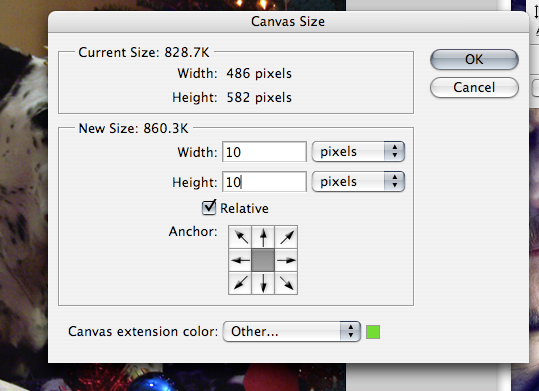
Bookmarks