


This is my first real try at HDR, no tripod but I still love it.


 Faux Punk Fatigue
This is my first real try at HDR, no tripod but I still love it.
 Mayor
Mayor
For what does HDR stand?
I've Been Frosted
 Registered User
Wow, that's beautiful! It almost looks like a painting
 Vet Assistant 16 years
From Wikipedia:Originally Posted by Karen
High dynamic range imaging (HDR)- is a set of techniques that allows a greater dynamic range of exposures (the range of values between light and dark areas) than normal digital imaging techniques. The intention of HDR is to accurately represent the wide range of intensity levels found in real scenes ranging from direct sunlight to shadows.
HDR was originally developed for use with purely computer-generated images. Later, methods were developed to produce a high dynamic range image from a set of photographs taken with a range of exposures.

RIP Dusty July 2 2007RIP Sabrina June 16 2011
The Bunspace Bunnies
It is beautiful!!
Andrea, mom of Gustav, Libby, Kimo & Luzie + Mike, Moki & Moehrchen behind the RBB
Please visit us on Bunspace.com
 RVT
RVT
I looked it up, but couldn't really find anywhere describing the technique. How do you go about doing this?
Faux Punk Fatigue
I use this thing on my camera that takes 3 photos at once in 3 different ways, one normal, one darker and one lighter, after I use photo matrix pro (free download) and upload all 3 photos which makes them into one and you can adjust the contrast, white tones ect... to make it how you want.
Thanks everyone.
 Love you and STILL miss U
That is beautiful! I just love it. More please? I wonder if my camera does that?
Look what I found in the Flickr HDR pool
http://www.flickr.com/photos/wiedman...-89888984@N00/
I still don't understand the process, though.
9/3/13
I did the right thing by setting you free
But the pain is very deep.
If only I could turn back time, forever, you I'd keep.
I miss you
I hear you whimper in your sleep
I gently pet you and say, no bad dreams
It will be alright, to my dog as dark as night.
Fur as dark as the night.
Join me on this flight.
Paws of love that follow me.
In my heart you'll forever be.
[/SIZE]
How I wish I could hold you near.
Turn back time to make it so.
Hug you close and never let go.
11/12/06
RVT
So you have a feature on your camera itself that does it and you just combine them later, ok.
So I guess my next question is do you have to have a specific type of camera to be able to do this?
This is odd I've never heard of this before... but now I really want to look into it. I hope I'm able to with my camera
Registered User
It's an awesome photo !! Great job !!
One question .. Near the upper left corner, I can faintly see the words "photo" something in the clouds .. What's that about?
It's still awesome!
 1 paw short of a HERD


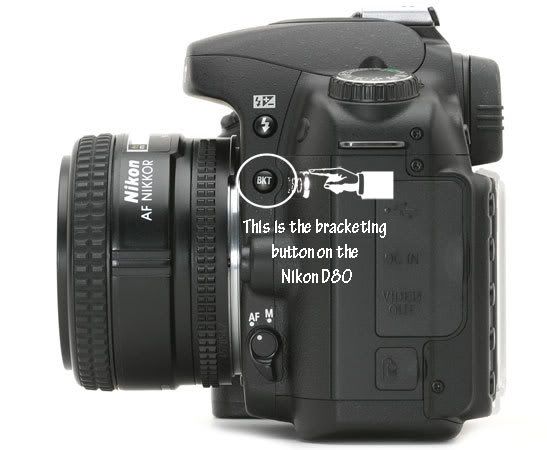
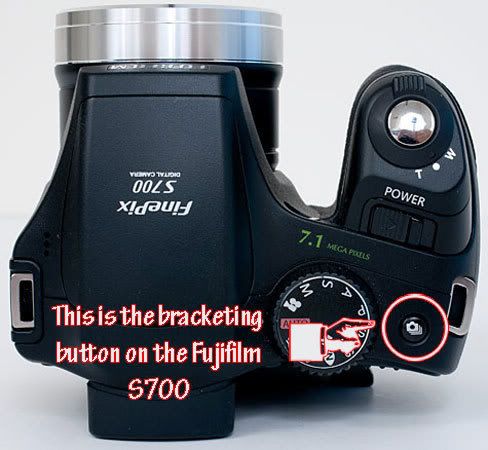
The feature you are referring to on your camera is called bracketing. On my D80 it is a small button that had BKT on it on the side on the camera. On my fujifilm S700 it is a symbol that looks like a camera with others beneath it. It differs from camera to camera but it is on most digital cameras.
This is the symbol on the D80.
It is the small button near the top on the side in the last picture.
This is the symbol on the Fujifilm S700.
It is the small button with the camera on it near the rear of the camera on the top.
1 paw short of a HERD
I am attaching the pic of your camera where the bracketing button is placed. Photobucket is being difficult and won't upload pics again. So here is the bracketing button on your camera.
1 paw short of a HERD
What camera do you have Val? I can search it and post a pic of where the button is located for you.
Michelle
Love you and STILL miss U
Well, that's one thing my camera won't do
I've got a Canon A630. From what I can tell, mine won't do it. I'm getting sleepy trying to find it.
1 paw short of a HERD
Val I am sorry to say your camera doesn't have built-in bracketing. You can do it manually though.
Here is an explaination I found on a forum on how to do it manually.
 Posting Permissions
Copyright © 2001-2013 Pet of the Day.com


 Reply With Quote



Bookmarks